







Zoom the image with the mouse
Cyberview CV-1602
• Available ⓘ
This product is available for order. Lead times vary by product and manufacturer.
A lead time will be provided after the order has been placed, or upon request before ordering.
Request Current Lead Time
Lead time and availability are subject to change without notice.
MSRP:
$1,306.00
$1,145.00
-->
(You save
$161.00
)
USB / PS/2 16-port 2 console KVM Switch from Cyberview 
CV-1602 Rear Diagram 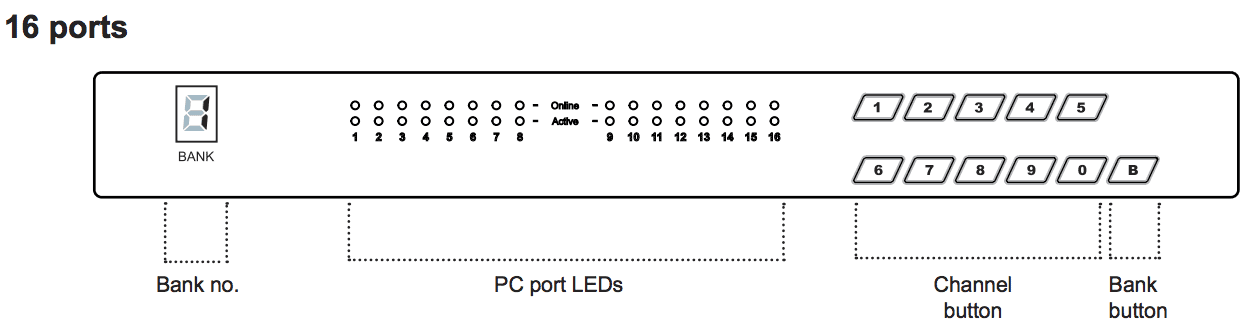 CV-1602 Front Diagram
The Cyberview two Consoles KVM switch enhanced the function of standard PS/2 KVM with two simultaneous users when one of them is sitting 500-feet away in maximum from the switch. The two consoles PS/2 KVM switch comes configured for either 8 or 16 ports.
The switch supports for variety of VGA monitor types as well as PS/2 keyboard, PS/2 mouse peripherals. Two Consoles KVM switch would also be an advisable choice as the cables connecting servers to switch are highly compatible. STP / UTP cable will be the one for connecting local switch to remote console.
CV-1602 Features
- Multi-platform - Mix PCs, SUN Microsystems, IBM compatibles, HP, Compaq and Dell.
- Hot Pluggable - Add PCs or remove connected PCs for maintenance without powering down the PS/2 KVM switch or PCs.
- No S/W required - Easy PC selection via on screen display manual, push buttons and hot-key.
- Support one CAT.5 remote console up to 500 feet away from KVM switch.
- Built-in microprocessor emulation for each port boots up process.
- High video quality with up to 1,920 x 1,440 and 200MHz bandwidth.
- Name servers up to 16 characters long.
- Scan mode with Monitor servers at intervals 5 to 99 seconds.
- Support eight characters password protection and search PC server name.
- VGA, keyboard & mouse all-in-one by 15pin HDDB connector at KVM side.
- Cascade for use up to 128 servers.
CV-1602 Layout
CV-1602 Rear Diagram
CV-1602 Front DiagramCyberView CV-1602 Highlights
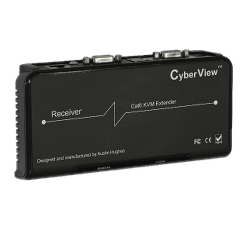
Integrated CATx extender
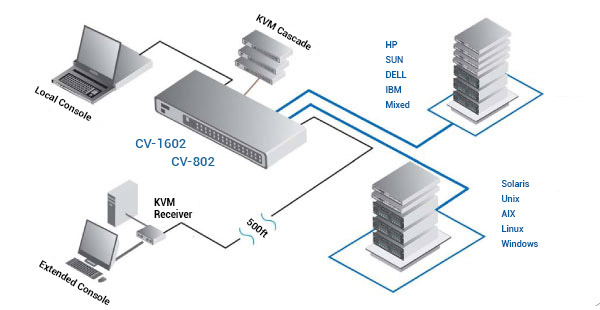
(1 Remote Users)The CV-1602 VGA DB-15 Combo KVM can be controlled by one user from up to 500ft (150m) away over CATx cable using the integrated CATx extender with the included KVM receiver.
- 1920 x 1200@60Hz (100ft)
- 1920 x 1080@60Hz (150ft)
- 1600 x 1200@60Hz (300ft)
- 1280 x 1024@60Hz (500ft)
Multi-platform support
The CyberView VGA DB-15 Combo KVM switches support any computer platform with USB, PS/2, or Sun keyboard and mouse interfaces, including all versions of Windows, Mac, Linux & SUN systems.
Multi-user access & management
One local user or one extended user can control 16 multi-platform servers. Expand up to 256 source computers simply by linking VGA DB-15 Combo KVMs.
Channel selection options
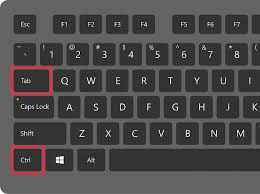
The CyberView CV-1602 can be switched using selectable keyboard hotkeys, front-panel push buttons, or with a mouse through an on-screen-display (OSD). These switching options allow you to quickly reassign connected devices to any of the connected computers.

Hot pluggable, no software or drivers required
Add PCs or remove connected PCs for maintenance without powering down the KVM switch or PCs. CyberView KVMs are designed to be driver & software-free.

Easy Expansion
(Cascading Units)Expand up to 256 source computers simply by linking VGA DB-15 Combo KVM units using CBC-6 cables. The CV-1602 KVM automatically detects up to 8 levels of cascade connections, which can be made up of a mix of CV-S801 / CV-S1601 KVM switches.
AC power OR Optional DC power
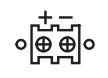
CyberView CV-1602 ships with 100-240V AC power. Alternatively, customers can also get 12V / 24V / 48V / 110V / 125V / 250V DC power input, integrated into the KVM.
1U rack mount OR Integrate into rack drawer
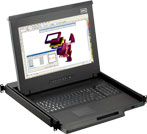
CyberView CV-1602 KVM switch can be rack mounted into 1U of space (rack brackets included), or it can be purchased integrated into a CyberView Rack Console. Small size also makes the units ideal for mounting behind third-party rack console.
CV-1602 Package Contents
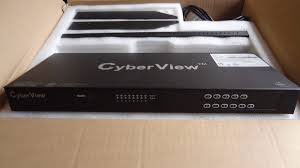
- (1) CV-1602 KVM Switch
- (1) 1U, 19" Rack mount kit w/ brackets & screws
- (1) Power adapter w/ US power cord - for KVM
Note, DC power excludes AC power cord. - (1) KVM receiver for extended console
- (1) Power adapter w/ US power cord - for receiver
- (1) 2-Year manufacturer warranty
- *Please note, package contents may change with unit 'options'.
CV-1602 Resources
 CV-1602 Datasheet (PDF)
CV-1602 Manual (PDF)
CV-1602 Specifications
| Local console | Cat5 Console | |
| PC port | 8/16 | N/A |
| Console Port | - | - |
| PC Selection | OSD menu, hot key, push button | OSD menu, hot key, push button |
| LED | 1 Bank LED, 8/16 Online LED (Green), 8/16 Selected LED (Red) | 1 Power LED (Green) and 1 Status LED (Red) |
| On screen display control | Yes | Yes |
| Scan Intervals | 5~99sec | 5~99sec |
| Keyboard and mouse emulation | PS/2 | PS/2 |
| VGA Resolution (Max.) | 1920x1440 | 1600x1200 |
| Cat5 Length | N/A | 500ft |
| Bandwidth | 200Mhz | 150Mhz |
| Cascade Level | 8 levels | 8 levels |
| PC Connection | 120/128 | 120/128 |
| Housing | Metal | Metal |
| KVM Switch Power Adapter | DC 12V | DC 9V |
CV-1602 KVM Hot Key Sequences
| Function | Hot Key Sequence |
| Calling OSD Menu | [Scr Lock] [Scr Lock] [Space Bar] Right Mouse + [Esc] |
| Previous Port | [Scr Lock] [Scr Lock] [Up] |
| Next Port | [Scr Lock] [Scr Lock] [Down] |
| Previous/Next Bank | [Scr Lock] [Scr Lock] + [PgUp/PgDn] |
| Switch to Specific Port | [Scr Lock] [Scr Lock] + Bank # + Port # |
| Buzzer On/Off | [Scr Lock] [Scr Lock] [B] |
| Logout (Password Security Must Be On) | [Scr Lock] [Scr Lock] [P] |
| Advanced HotKeys (For Supervisor Login Only) | |
| AutoScan Mode | [Scr Lock] [Scr Lock] [S] |
| Reset Factory Defualts | [Scr Lock] [Scr Lock] [R] |
| Disable/Enable Password Security | [Scr Lock] [Scr Lock] [U] |
| Enable/Disable Screen Saving | [Scr Lock] [Scr Lock] [L] |
| Remote Console HotKeys | |
| Toggle Remote/Local Port | [Scr Lock] [Scr Lock] [C] |
| Buzzer On/Off | [Scr Lock] [Scr Lock] [Q] |
| AutoScan Mode | [Scr Lock] [Scr Lock] [S] |
| Auto Adjust Video Signal | [Scr Lock] [Scr Lock] [A] |
CV-1602 is also known as:
- 1602
USB / PS/2 16-port 2 console KVM Switch from Cyberview
CV-1602 Rear Diagram CV-1602 Front Diagram
The Cyberview two Consoles KVM switch enhanced the function of standard PS/2 KVM with two simultaneous users when one of them is sitting 500-feet away in maximum from the switch. The two consoles PS/2 KVM switch comes configured for either 8 or 16 ports.
The switch supports for variety of VGA monitor types as well as PS/2 keyboard, PS/2 mouse peripherals. Two Consoles KVM switch would also be an advisable choice as the cables connecting servers to switch are highly compatible. STP / UTP cable will be the one for connecting local switch to remote console.
CV-1602 Features
- Multi-platform - Mix PCs, SUN Microsystems, IBM compatibles, HP, Compaq and Dell.
- Hot Pluggable - Add PCs or remove connected PCs for maintenance without powering down the PS/2 KVM switch or PCs.
- No S/W required - Easy PC selection via on screen display manual, push buttons and hot-key.
- Support one CAT.5 remote console up to 500 feet away from KVM switch.
- Built-in microprocessor emulation for each port boots up process.
- High video quality with up to 1,920 x 1,440 and 200MHz bandwidth.
- Name servers up to 16 characters long.
- Scan mode with Monitor servers at intervals 5 to 99 seconds.
- Support eight characters password protection and search PC server name.
- VGA, keyboard & mouse all-in-one by 15pin HDDB connector at KVM side.
- Cascade for use up to 128 servers.
CV-1602 Layout
CV-1602 Rear Diagram
CV-1602 Front DiagramCyberView CV-1602 Highlights
-
Integrated CATx extender
(1 Remote Users)The CV-1602 VGA DB-15 Combo KVM can be controlled by one user from up to 500ft (150m) away over CATx cable using the integrated CATx extender with the included KVM receiver.
- 1920 x 1200@60Hz (100ft)
- 1920 x 1080@60Hz (150ft)
- 1600 x 1200@60Hz (300ft)
- 1280 x 1024@60Hz (500ft)
-
Multi-platform support
The CyberView VGA DB-15 Combo KVM switches support any computer platform with USB, PS/2, or Sun keyboard and mouse interfaces, including all versions of Windows, Mac, Linux & SUN systems.
-
Multi-user access & management
One local user or one extended user can control 16 multi-platform servers. Expand up to 256 source computers simply by linking VGA DB-15 Combo KVMs.
-
Channel selection options
The CyberView CV-1602 can be switched using selectable keyboard hotkeys, front-panel push buttons, or with a mouse through an on-screen-display (OSD). These switching options allow you to quickly reassign connected devices to any of the connected computers.
-
Hot pluggable, no software or drivers required
Add PCs or remove connected PCs for maintenance without powering down the KVM switch or PCs. CyberView KVMs are designed to be driver & software-free.
-
Easy Expansion
(Cascading Units)Expand up to 256 source computers simply by linking VGA DB-15 Combo KVM units using CBC-6 cables. The CV-1602 KVM automatically detects up to 8 levels of cascade connections, which can be made up of a mix of CV-S801 / CV-S1601 KVM switches.
-
AC power OR Optional DC power
CyberView CV-1602 ships with 100-240V AC power. Alternatively, customers can also get 12V / 24V / 48V / 110V / 125V / 250V DC power input, integrated into the KVM.
-
1U rack mount OR Integrate into rack drawer
CyberView CV-1602 KVM switch can be rack mounted into 1U of space (rack brackets included), or it can be purchased integrated into a CyberView Rack Console. Small size also makes the units ideal for mounting behind third-party rack console.
CV-1602 Package Contents
- (1) CV-1602 KVM Switch
- (1) 1U, 19" Rack mount kit w/ brackets & screws
- (1) Power adapter w/ US power cord - for KVM
Note, DC power excludes AC power cord. - (1) KVM receiver for extended console
- (1) Power adapter w/ US power cord - for receiver
- (1) 2-Year manufacturer warranty
- *Please note, package contents may change with unit 'options'.
CV-1602 Resources
CV-1602 Datasheet (PDF)
CV-1602 Manual (PDF)
CV-1602 Specifications
| Local console | Cat5 Console | |
| PC port | 8/16 | N/A |
| Console Port | - | - |
| PC Selection | OSD menu, hot key, push button | OSD menu, hot key, push button |
| LED | 1 Bank LED, 8/16 Online LED (Green), 8/16 Selected LED (Red) | 1 Power LED (Green) and 1 Status LED (Red) |
| On screen display control | Yes | Yes |
| Scan Intervals | 5~99sec | 5~99sec |
| Keyboard and mouse emulation | PS/2 | PS/2 |
| VGA Resolution (Max.) | 1920x1440 | 1600x1200 |
| Cat5 Length | N/A | 500ft |
| Bandwidth | 200Mhz | 150Mhz |
| Cascade Level | 8 levels | 8 levels |
| PC Connection | 120/128 | 120/128 |
| Housing | Metal | Metal |
| KVM Switch Power Adapter | DC 12V | DC 9V |
CV-1602 KVM Hot Key Sequences
| Function | Hot Key Sequence |
| Calling OSD Menu | [Scr Lock] [Scr Lock] [Space Bar] Right Mouse + [Esc] |
| Previous Port | [Scr Lock] [Scr Lock] [Up] |
| Next Port | [Scr Lock] [Scr Lock] [Down] |
| Previous/Next Bank | [Scr Lock] [Scr Lock] + [PgUp/PgDn] |
| Switch to Specific Port | [Scr Lock] [Scr Lock] + Bank # + Port # |
| Buzzer On/Off | [Scr Lock] [Scr Lock] [B] |
| Logout (Password Security Must Be On) | [Scr Lock] [Scr Lock] [P] |
| Advanced HotKeys (For Supervisor Login Only) | |
| AutoScan Mode | [Scr Lock] [Scr Lock] [S] |
| Reset Factory Defualts | [Scr Lock] [Scr Lock] [R] |
| Disable/Enable Password Security | [Scr Lock] [Scr Lock] [U] |
| Enable/Disable Screen Saving | [Scr Lock] [Scr Lock] [L] |
| Remote Console HotKeys | |
| Toggle Remote/Local Port | [Scr Lock] [Scr Lock] [C] |
| Buzzer On/Off | [Scr Lock] [Scr Lock] [Q] |
| AutoScan Mode | [Scr Lock] [Scr Lock] [S] |
| Auto Adjust Video Signal | [Scr Lock] [Scr Lock] [A] |
CV-1602 is also known as:
- 1602
Related Products