






Zoom the image with the mouse
NTI PRIMUX-8X32
• Discontinued ⓘ
This product has been discontinued by the manufacturer and is no longer available for purchase.
Looking for a replacement or comparable alternative?
Request Options
Lead time and availability are subject to change without notice.
Product Code:
PRIMUX-8X32
Start Call for Price Product View Page short code
Ended Call for Price Product View Page short code
KVM Matrix Switch for up to 8 simultaneous users to up to 32 servers to 1000ft away
The NTI PRIMUX-8X32 is the PRIMUX KVM Matrix Switch via CAT5 provides non-blocking access for up to 8 simultaneous users to up to 32 servers. The switch frees up valuable space by eliminating large KVM switchboxes and bulky hard-to-manage coax cables. It is an ideal solution for high-density server environments.
The PRIMUX system consists of three components: Matrix Switch, connects users to servers; Host Adapters, connect to each server; and User Stations, connect to each set of user-station equipment - keyboard, monitor and mouse. The User Stations and Host Adapters can be located as far as 1,000 feet from each other, and are connected to the matrix switch via CAT5/5e/6 UTP cable.
NTI PRIMUX-8X32 Features:
- Multi-user, multi-platform, multi-rack access.
- Platform-specific host adapters for host connection - PS/2, USB and SUN.
- Ideal for hazardous/unsecured environments. The User Stations can be located up to 1,000 feet from the servers.
- Inexpensive CAT5/5e/6 UTP cable replaces bulky KVM cables.
- Simple plug-and-play auto-configured installation.
- Servers are discovered as they are powered up, and can be accessed immediately by authorized users.
- Hot-swap components with no disruption of server operation.
- Supports video resolutions to 1920x1440.
- Automatically adjusts the video quality to compensate for varying lengths of CAT5/5e/6 cable.
- Dedicated microprocessors prevent CPUs from locking up, ensuring reliable control.
- Real time power status of connected servers.
- Provides connection to servers during power up at the BIOS level.
- Command and control provided by OSD of connected User Station.
- Flash upgradeable.
NTI PRIMUX-8X32 Details:
User Station:
Monitor:
-
Female 15-pin HD connector.
-
A multiscan VGA monitor is required to display the different video outputs from different platforms.
-
Maximum 1024x768 video resolution at 1,000 feet; higher resolutions are supported at shorter distances.
-
Supports Separate and Composite TTL level sync.
- Supports the DDC2B.
Devices:
- Two female USB Type A/two 6-pin miniDIN connectors.
- Supports all standard PS/2 keyboards and most USB keyboards with Windows or SUN keyboard layout.
- Keyboards and mice are hot-pluggable.
- NTI recommends using a USB SUN keyboard if there are SUN hosts being controlled.
- User keyboard and mouse must be of the same platform.
- Supports standard 2-button PS/2 mice, as well as:
- Microsoft IntelliMouse¨.
- Logitech (and other) 3-button mice.
- Alps Glidepoint touchpad (extended functions, i.e. tapping, etc., are not supported).
- Cirque Glidepoint touchpad.
- IBM Scroll Point mouse (extended stick functions are not supported).
- Kensington Orbit trackball.
- Logitech 2-button wheel mouse.
- Microsoft Ballpoint mouse.
- USB SUN 3-button mice are supported.
- Most USB mice (up to 3 buttons), including Microsoft USB Intellimouse.
Control Methods:
On Screen Display:
-
Use keyboard or mouse to operate the switch from menus superimposed onto the monitor.
-
Displays the platform, name, and power status of the connected servers.
-
Allows color skew and video compensation fine tuning for optimal video quality.
-
Locate and select servers by name.
-
Names can be up to 16 characters long.
-
Help Screens assist users with OSD.
-
Modify the size and position of the OSD.
-
OS- and software-independent.
-
Various administrator configuration features, including users, servers and user stations.
Security:
-
Administrator can enable or disable all security features and select which servers each user can access.
-
Add or remove authorized users.
-
Set individual user names and passwords for each user.
Modes of Operation:
-
Normal- a user connected to a host. Scan- user is subsequently connected to hosts from a list.
-
Sharing- the administrator can select for each host a sharing attribute, which defines multiple user access to the host
-
None (not shared)- one user is connected to the host and control it. No other user may select nor control that host.
-
Limited (video shared)- one user is connected to and controls the host. Other users may select and see the video output from the host, but not control the host.
-
Full (shared)- a host may be selected by many users; the host is still controlled by one user, but its control may be given to any other user after an inactivity timeout (share idle time).
-
RS232:
-
Configuration can be done through the serial port.
-
Baud rate: 115200
Ethernet Control:
-
Configuration can be done over the Internet via Telnet.
-
10/100 BaseT Ethernet interface.
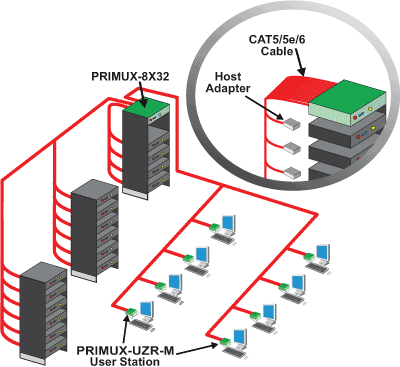
NTI PRIMUX-8X32 Application Diagram
NTI PRIMUX-8X32 Specifications:
| Mechanical | |
| Width | 19 in. (7.5 cm.) |
| Height | 1.75 in. (0.7 cm.) |
| Depth | 12 in. (4.7 cm.) |
| Connectors |
|
| Environmental | |
| Operating Temperature | 32°F to 100°F (0°C to 38°C). |
| Storage Temperature | -20°F to 140°F (-30°C to 60°C). |
| Operating and Storage Relative Humidity | 17 to 90% non-condensing RH. |
| Host Adapters | |
| Hosts | One platform specific (USB + PS/2, SUN) HA-x host adapter is required for each computer. |
| HA-UNV |
|
| HA-SUN | Compatible with legacy SUN computers with VGA video. One male 15-pin HD and one male 8-pin miniDIN connectors. |
| Cables | Use CAT5, CAT5e or CAT6 UTP cable to daisy chain host adapters and user station. Use Cat5, Cat6e, Cat6 UTP straight through cable for TIA/EIA-568B wiring terminated with standard RJ45 connectors. Cables not included. |
| Power | 110 or 220 VAC at 50 or 60 Hz via IEC connector. |
| Regulatory Approvals | CE and RoHS |
Recommended Replacements
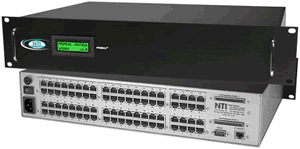
KVM Matrix Switch for up to 8 simultaneous users to up to 32 servers to 1000ft away
The NTI PRIMUX-8X32 is the PRIMUX KVM Matrix Switch via CAT5 provides non-blocking access for up to 8 simultaneous users to up to 32 servers. The switch frees up valuable space by eliminating large KVM switchboxes and bulky hard-to-manage coax cables. It is an ideal solution for high-density server environments.
The PRIMUX system consists of three components: Matrix Switch, connects users to servers; Host Adapters, connect to each server; and User Stations, connect to each set of user-station equipment - keyboard, monitor and mouse. The User Stations and Host Adapters can be located as far as 1,000 feet from each other, and are connected to the matrix switch via CAT5/5e/6 UTP cable.
NTI PRIMUX-8X32 Features:
- Multi-user, multi-platform, multi-rack access.
- Platform-specific host adapters for host connection - PS/2, USB and SUN.
- Ideal for hazardous/unsecured environments. The User Stations can be located up to 1,000 feet from the servers.
- Inexpensive CAT5/5e/6 UTP cable replaces bulky KVM cables.
- Simple plug-and-play auto-configured installation.
- Servers are discovered as they are powered up, and can be accessed immediately by authorized users.
- Hot-swap components with no disruption of server operation.
- Supports video resolutions to 1920x1440.
- Automatically adjusts the video quality to compensate for varying lengths of CAT5/5e/6 cable.
- Dedicated microprocessors prevent CPUs from locking up, ensuring reliable control.
- Real time power status of connected servers.
- Provides connection to servers during power up at the BIOS level.
- Command and control provided by OSD of connected User Station.
- Flash upgradeable.
NTI PRIMUX-8X32 Details:
User Station:
Monitor:
-
Female 15-pin HD connector.
-
A multiscan VGA monitor is required to display the different video outputs from different platforms.
-
Maximum 1024x768 video resolution at 1,000 feet; higher resolutions are supported at shorter distances.
-
Supports Separate and Composite TTL level sync.
- Supports the DDC2B.
Devices:
- Two female USB Type A/two 6-pin miniDIN connectors.
- Supports all standard PS/2 keyboards and most USB keyboards with Windows or SUN keyboard layout.
- Keyboards and mice are hot-pluggable.
- NTI recommends using a USB SUN keyboard if there are SUN hosts being controlled.
- User keyboard and mouse must be of the same platform.
- Supports standard 2-button PS/2 mice, as well as:
- Microsoft IntelliMouse¨.
- Logitech (and other) 3-button mice.
- Alps Glidepoint touchpad (extended functions, i.e. tapping, etc., are not supported).
- Cirque Glidepoint touchpad.
- IBM Scroll Point mouse (extended stick functions are not supported).
- Kensington Orbit trackball.
- Logitech 2-button wheel mouse.
- Microsoft Ballpoint mouse.
- USB SUN 3-button mice are supported.
- Most USB mice (up to 3 buttons), including Microsoft USB Intellimouse.
Control Methods:
On Screen Display:
-
Use keyboard or mouse to operate the switch from menus superimposed onto the monitor.
-
Displays the platform, name, and power status of the connected servers.
-
Allows color skew and video compensation fine tuning for optimal video quality.
-
Locate and select servers by name.
-
Names can be up to 16 characters long.
-
Help Screens assist users with OSD.
-
Modify the size and position of the OSD.
-
OS- and software-independent.
-
Various administrator configuration features, including users, servers and user stations.
Security:
-
Administrator can enable or disable all security features and select which servers each user can access.
-
Add or remove authorized users.
-
Set individual user names and passwords for each user.
Modes of Operation:
-
Normal- a user connected to a host. Scan- user is subsequently connected to hosts from a list.
-
Sharing- the administrator can select for each host a sharing attribute, which defines multiple user access to the host
-
None (not shared)- one user is connected to the host and control it. No other user may select nor control that host.
-
Limited (video shared)- one user is connected to and controls the host. Other users may select and see the video output from the host, but not control the host.
-
Full (shared)- a host may be selected by many users; the host is still controlled by one user, but its control may be given to any other user after an inactivity timeout (share idle time).
-
RS232:
-
Configuration can be done through the serial port.
-
Baud rate: 115200
Ethernet Control:
-
Configuration can be done over the Internet via Telnet.
-
10/100 BaseT Ethernet interface.
NTI PRIMUX-8X32 Application Diagram
NTI PRIMUX-8X32 Specifications:
| Mechanical | |
| Width | 19 in. (7.5 cm.) |
| Height | 1.75 in. (0.7 cm.) |
| Depth | 12 in. (4.7 cm.) |
| Connectors |
|
| Environmental | |
| Operating Temperature | 32°F to 100°F (0°C to 38°C). |
| Storage Temperature | -20°F to 140°F (-30°C to 60°C). |
| Operating and Storage Relative Humidity | 17 to 90% non-condensing RH. |
| Host Adapters | |
| Hosts | One platform specific (USB + PS/2, SUN) HA-x host adapter is required for each computer. |
| HA-UNV |
|
| HA-SUN | Compatible with legacy SUN computers with VGA video. One male 15-pin HD and one male 8-pin miniDIN connectors. |
| Cables | Use CAT5, CAT5e or CAT6 UTP cable to daisy chain host adapters and user station. Use Cat5, Cat6e, Cat6 UTP straight through cable for TIA/EIA-568B wiring terminated with standard RJ45 connectors. Cables not included. |
| Power | 110 or 220 VAC at 50 or 60 Hz via IEC connector. |
| Regulatory Approvals | CE and RoHS |